Re-Opens on 28th of April (100 seats Limit)

The pyRevit Challenge #2
Build 21 useful pyRevit tools
to Learn Revit API by doing
Most tutorials show you perfect code on the first try and pretend it's normal. (it's not…)
Instead, I'll teach you a Repeatable 7-Step Process that includes the "messy-middle" like in real world.
That's how become confident to build tool #22 completely on your own.
Join pyRevit Challenge →
See how it works


98+ BIM Experts took pyRevit challenge
You've been learning pyRevit
the slow way… It's not your fault!
You probably spend too much time on theory and tutorials.
And not enough on practice… Luckily, there's a way out.
WHAT KEEPS YOU STUCK
WHAT ACTUALLY WORKS
won't make you a developer.
Repeating the same method x21 times will.
That's what this challenge is build on.
One PROCESS, repeated 21 times to create practical tools.
Scroll down to see how it works…

1
2
3
4
5
6
7
8
9
10
11
12
13
14
15
16
17
18
19
20
21
By Tool #11, you become dangerous with pyRevit
And by the end, you'll be a Real Dev with proof.
21 Practical pyRevit Tools • Each takes ~60-120 min/day
One repeatable process.
Twenty-one times.
Until it's a habit.
You won't have long theory lesson.
Instead, the 7-Step Process will guide you how to Think, Code and Test for best results. That's how you'll naturally become an independent developer.
Every Tool follows the same 7 Steps:
P
PLAN
R
RESEARCH
O
OUTLINE
C
CODE
E
EDIT
S
STRESS-TEST
S
SHIP
P
Plan - Get clear on what problem you solve and WHY
Before you open the code editor - you need a plan.
Brainstorm what problem are you solving and think of any potential problems or bugs.
Before you open the code editor, grab a pen. Brainstorm the tool in plain English. Break the idea into small steps. Think of potential problems or bugs. The messier your paper, the cleaner your code.
# This is the step tutorials often skip - but it's very important one.

I was tired of watching
talented people quit too early.
They watch tutorials, they ask AI, but it still doesn't click.
They are smart. They just don't have the right system. And they don't practice enough. They just need the right frameworks and a Kick In The Butt motivation when they feeling low or about to quit. (It would be my honour to help you with both)
That's why this challenge exists.
Me and hundred students are creating the same tools around the world.
Each tool introduces new concepts while reinforcing previous ones. And if feeling stuck - get help using provided Coding Cheat Sheets, Step-By-Step Tutorials, Challenge Group or just ask a question during weekly Live Q/A Sessions.
My goal is to provide you everything to succeed while keeping it challenging enough so you can practice, learn and grow at your own pace without ever feeling stuck.
Peter Le Roux
/ BIM Project Manager
Top 3 Benefits acording to Peter:
#1 - TUTORIALS
"You really get the knowledge into your head as you're physically typing it out."
#2 - PRACTICE
"From day one, you're writing tools you're going to use. No theory."
#3 - COMMUNITY
"Great to meet people from every continent in the world who are working on the same thing as you are."
But I have ChatGPT,
Why pay for this?
Fair question. I also use AI every day…
But the difference is understanding programming fundaments and development process. Once you get it - your prompts are on another level, and outputs actually deliver results.
You need fundamentals with or without AI…
Ask Chat GPT
Write me tool to automate my sheets.
Make no mistakes.
Sure, just use doc.AutomateSheets(sheets)
This is exactly what you're looking for.
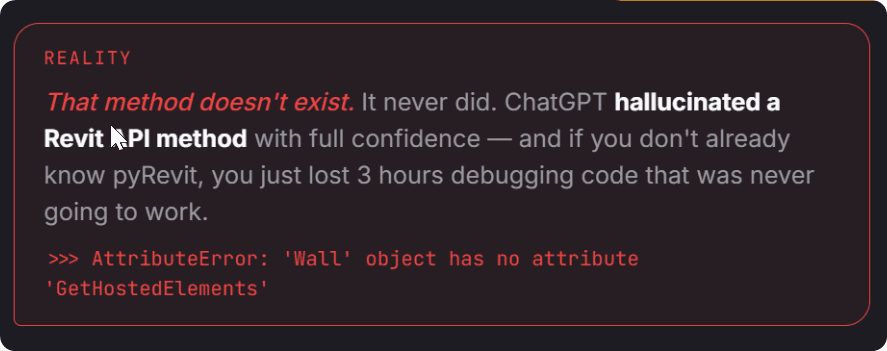
I get AttributeError.
What's wrong? What does it mean?
REALITY
You're right. That method doesn't exist. I hallucinated Revit API method with full confidence.
AI is a junior developer working for you.
But it needs a senior to supervise (That's You).

Let me show you how it works…
It's quite unique…
Every day is one full PROCESS cycle.
By the end, you ship a real tool and learn from it.
P
Plan what problem to solve and WHY
R
Research for code and resources to help you.
O
Outline script in plain English to brainstorm.
C
Code quick and dirty until we have proof of concept.
E
Edit your code to make it better, faster and more readable.
S
Stress-Test your tool. Break it to find bugs before anyone else does it.
S
Ship production-ready tool to your team.
Why don't you try one of Challenge Days yourself?
Check FREE Sample Day
Kees Groenendijk
/ BIM Architect
Top 3 Benefits acording to Peter:
#1 - TUTORIALS
"You really get the knowledge into your head as you're physically typing it out."
#2 - PRACTICE
"From day one, you're writing tools you're going to use. No theory."
#3 - COMMUNITY
"Great to meet people from every continent in the world who are working on the same thing as you are."
And now you wonder…
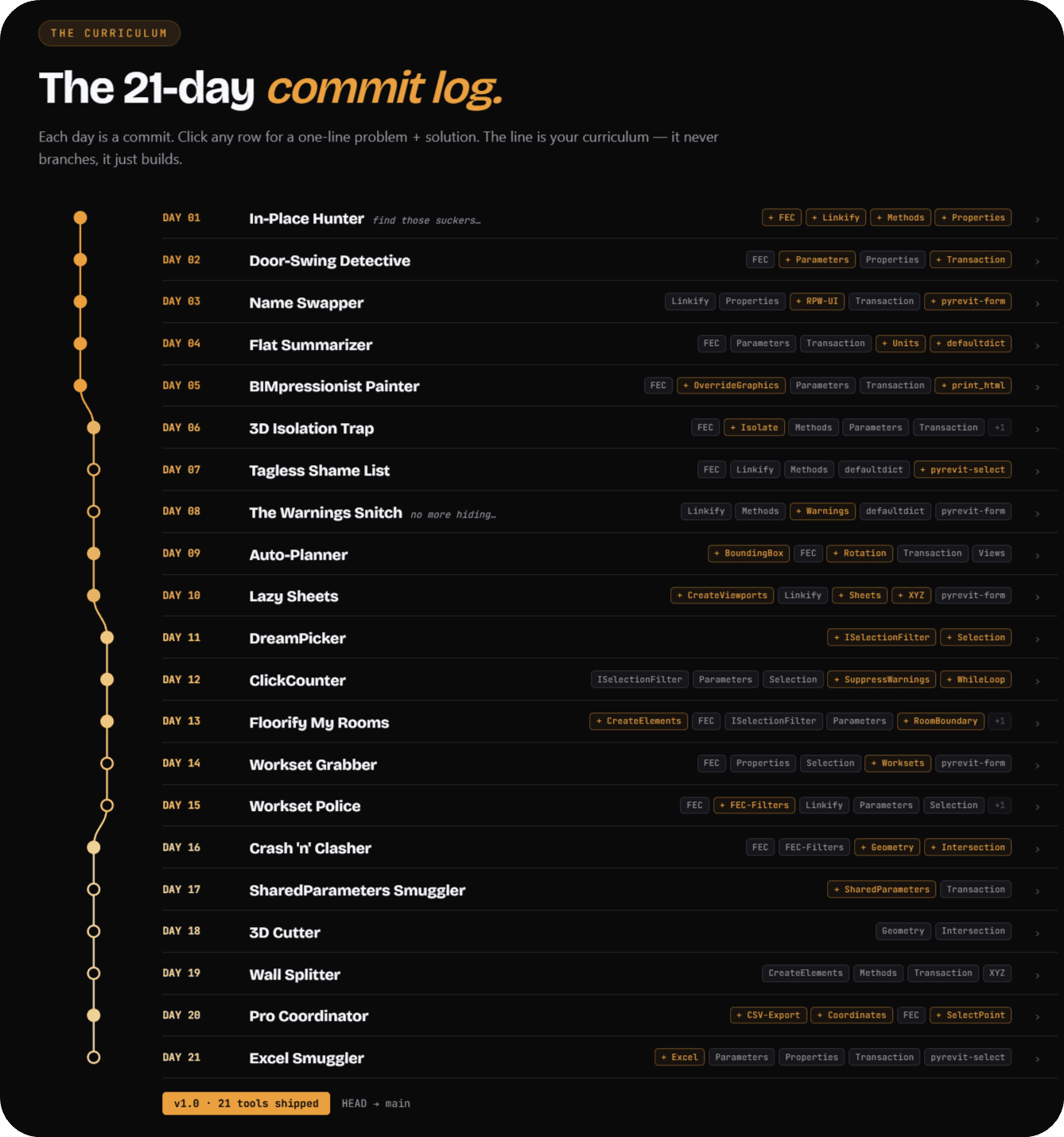
What kind of 21 tools we will create?
Glad you asked…
Scroll down to get a taste of pyRevit Challenge
21 Tools, ordered to learn
new concepts every day
and reinforce the last
Every tool is picked for two reasons:
it introduces new Revit API concepts gradually,
and it reinforces concepts from earlier days.
That's why students learn how to think, code and test like developers.
You'll become different person
With Different Skillset.
Practice compaunds silently. You won't feel the shift day to day- but looking back after 21 tools othe gap will be absurd. Here's what you can expect from each phase during the challenge.
Day 0 • NOW
0
/21
TOOLS SHIPPED
Stuck in tutorial loop.
Understand Revit API/pyRevit
Know how to create tools
Automate boring tasks
Day 1 • FIRST TOOL
1
/21
TOOLS SHIPPED
Your first button.
First custom tool in Revit
Taste of writing code
Revit API Fundamentals
Day 7 • GETTING DANGEROUS
7
/21
TOOLS SHIPPED
It starts to click.
Revit API Fundamentals
Understand API logic
Build real tools
Day 21 • DEVELOPER MODE
21
/21
TOOLS SHIPPED
You think like a Dev.
21 custom tools shipped
Repeatable dev process
Ability to make more tools
The prize is NOT 21 Tools.
It's the ability to create next tools without me
And that's what the process is for.
This challenge is NOT for everyone.
Be honest with yourself
I'd rather you skip this than join and ghost...
I intentionally put 100 seats limit per challenge, so our community grows at a steady rate and I can help new participants crush this challenge without a mess.
Join if you're ready to
This is for you! Join below.
Skip it if you
Save your money - this really isn't for you
This Investment will change how you
think and solve your Revit problems
Join pyRevit Challenge
OPEN NOW Seats Left: 27/100
Everything you need to ship 21 real pyRevit tools with the community, cheat sheets, bonuses and live Q/A to keep you moving.
€249
(+ VAT)
ONE-TIME PAYMENT · 60 DAYS OF ACCESS
✓ 21 Daily Tasks with real problems to solve
✓ 21 Coding Cheat-Sheets to guide you
✓ 21 Step-By-Step video tutorials with solutions
Plus Awesome bonuses to help you win…
✓ Mini-Course: pyRevit FastTrack Setup
✓ Masterclass: 7-Step Process for creating new pyRevit tools
✓ Community: Private LinkedIn Group Access
✓ Live Q/A Sessions to get direct, personalized answers.
✓ pyRevit 'Dream Tool' Hackathon with €3,591 Prize Pool
Join the Challenge — €249 →
OPTIONAL
UPGRADE
Lifetime Access
+ €99
Keep every tool, video and every cheat sheet forever.
Prolong your learning journey, or keep coming back to reference the process that you're about to learn.
See how guarantee works »